
Know exactly where you stand
Grade Tracker for University Students
See your current weighted grade at a glance. Know what average you need on remaining activities to hit your target - before it's too late. Also, save your grades to your Google Drive so you can edit your grades at anytime.
The problem
Mid-semester, most students don't actually know their grade
Quizzes are worth 20%, the midterm 25%, some quizzes get dropped, there's a bonus mark somewhere… Working out your real weighted grade by hand is tedious and easy to get wrong — so many students only find out where they stand when it's too late to fix it.
The solution
A grade tracker that does the weighted math for you
Enter each graded item with its syllabus weight and the tracker instantly computes your current weighted grade, your projected final grade, and the average you need on remaining work to hit your target — with grade rules and bonus marks built right into the math.
How it works
How the Grade Tracker works
Add your graded work
Enter each assignment, quiz, or exam with the grade you got and its % weight from the syllabus.
Set your rules and target
Add grade rules (like “drop the 3 lowest quizzes”), bonus marks, and the final grade you're aiming for.
Watch the math update live
See your current weighted grade, projected final, and the average you need on the rest — updated instantly as new grades come in.
Why it helps
Why it helps students
No more guessing
You always know your real standing in every course — no spreadsheet, no formula mistakes.
Act before it's too late
Knowing the average you need on remaining work tells you early which courses need more effort.
Handles the messy cases
Dropped quizzes, bonus marks, and uneven weights are exactly where hand calculations go wrong — the tracker gets them right.
Free forever plan — no payment needed to start.
Try it yourself
Try the course grade calculator
Add a few grade items below and watch your weighted grade compute live — free, right on this page.
Rules let you drop your lowest grades automatically — e.g. "keep best 3 of 4 assignments".
We never store your data.
Your Course Grade
Your Grade
Fill in your grade items and press Calculate to see your current course grade.
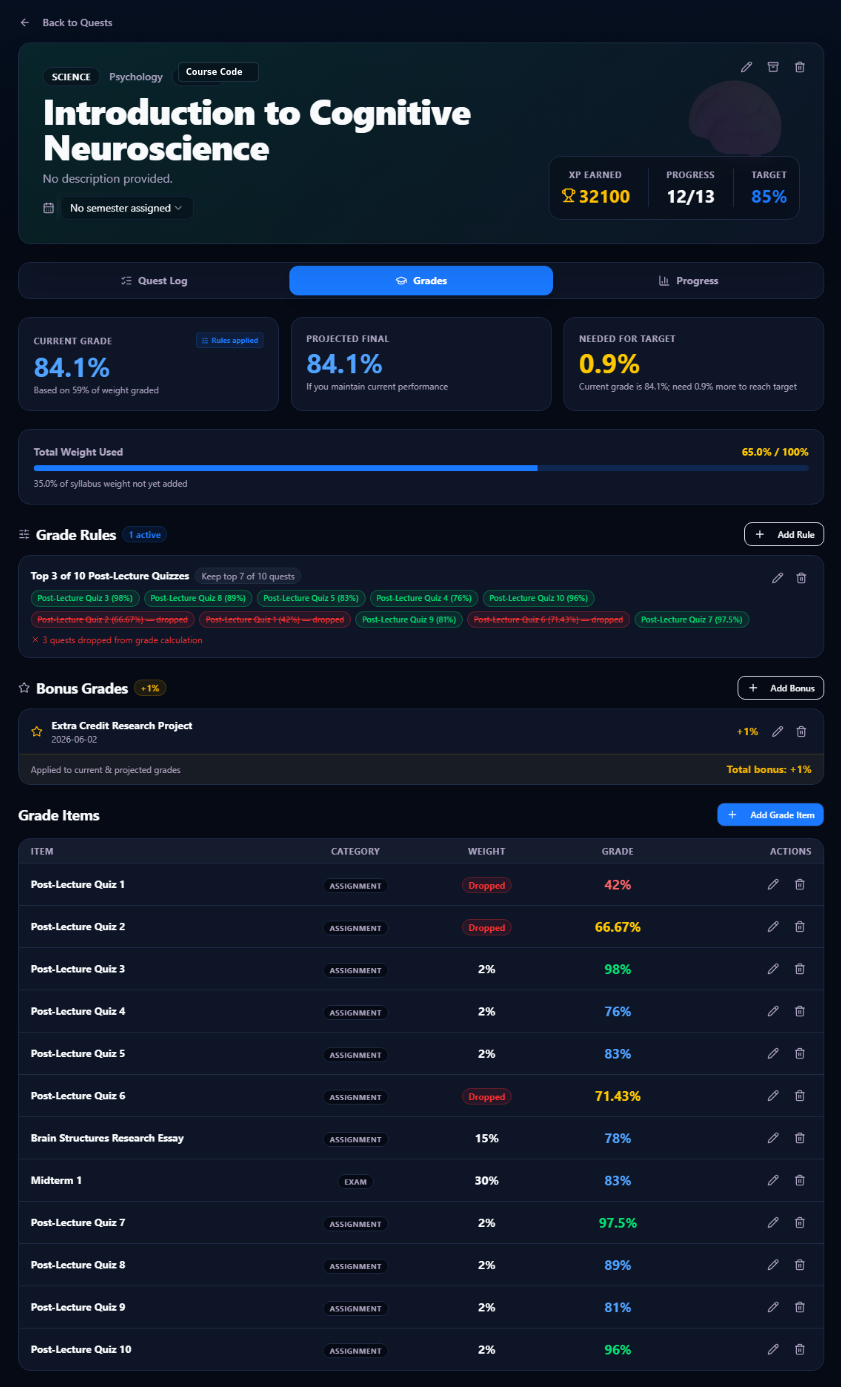
Your Grades at a glance
Your current grade considers all of your graded items, grade rules, and bonus marks - leaving you with a great estimate of where you stand in your courses. The needed for target grade tells you how much percent you need to reach your target grade. Here, you can also find out the average grade needed on remaining course work to reach your target grade.
Grade Rules
Does your professor drop your 3 lowest quizzes? With Grade Rules, you can pre-set them before your quiz grades get released, so your current grade will always be as accurate as can be!
Bonus Grades
If you're lucky enough to have a professor that gives bonus mark opportunities, keep track of them in our app and it will update the current grade counter in our app.
Grade items
See all your grades from completed quests - their grades, their weights, which ones get dropped, and more.
More Free Tools for University Students
Calculate your weighted course grade from your assignment, quiz, and exam marks — with Grade Rules for dropped quizzes.
Back-calculate your final exam grade range from your term grade and final course grade.
Turn lectures, assignments, and exams into quests, plan your semester, and earn XP for studying.
Create a whole semester of numbered quizzes or labs in one prompt and import them to your calendar.